

WhatsApp Rolls Out Redesigned Floating Bottom Navigation Bar on Android Beta
WhatsApp is rolling out a new bottom navigation bar on Android beta (v2.26.45.5), featuring an icon-only floating pill design, adaptive scrolling, and progressive blur.
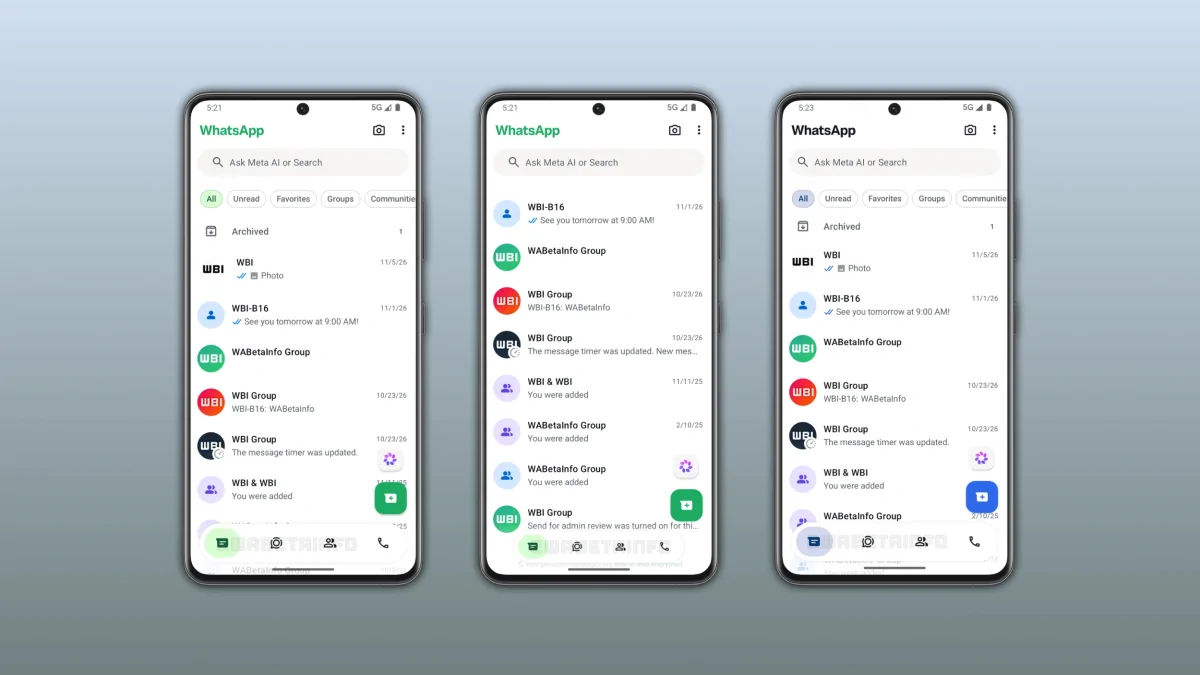
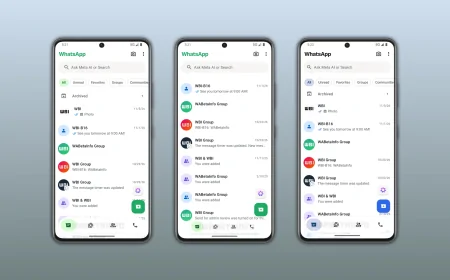
WhatsApp is rolling out a new bottom navigation bar on Android, bringing one of the most noticeable visual upgrades to the messaging app in recent years. Starting with the latest WhatsApp beta for Android 2.26.45.5 update on the Google Play Store (alongside compatible build 2.26.45.3), the platform is replacing its traditional edge-to-edge bottom bar with a modern, floating pill-shaped navigation bar that dynamically adjusts its size as you scroll.
For millions of smartphone users in Bangladesh and around the world who rely on WhatsApp for daily communication, study groups, and office coordination, the redesigned interface offers a cleaner view with more vertical screen space for reading messages.
What Changes as WhatsApp Is Rolling Out a New Bottom Navigation Bar on Android
When WhatsApp first moved its primary navigation tabs from the top of the screen to the bottom on Android, the goal was to make one-handed thumb navigation easier on large smartphones. Now, the company is refining that layout further by detaching the bar from the bottom and side edges of the screen.
Instead of a wide, flat strip anchored to the bottom frame, the updated interface introduces a floating capsule that sits slightly above the lower edge of the display. This gives the Android app a lighter, more contemporary look while keeping all core sections within easy reach of your thumb.
Icon-Only Layout Without Text Labels
One of the first things users will notice is the removal of text labels underneath the navigation icons. Because regular users are already familiar with the icons for Chats, Updates, Contacts (or Communities), and Calls, dropping the text captions allows the bar to take up far less room on the screen.
The floating bar also works smoothly with five-tab configurations. For testers who have access to the dedicated You profile tab alongside Chats, Updates, Contacts, and Calls, all five icons fit neatly inside the floating capsule without feeling cramped.
Circular Tab Highlights and Custom Accent Colors
WhatsApp has also updated how the active tab is highlighted. Previously, selecting a tab placed an elongated pill-shaped indicator around the icon. In the new design, the selected tab is marked by a neat circular highlight directly around the active icon.
The active indicator automatically follows the app's theme color:
- Standard Users: The circular highlight displays WhatsApp's signature green accent color in both light and dark modes.
- WhatsApp Plus Subscribers: Users who have access to custom theme colors through WhatsApp Plus will see their chosen accent color applied directly to the selected tab highlight, keeping the entire interface visually consistent.
How the New Adaptive Bottom Navigation Bar Works on Android
Beyond aesthetics, the biggest functional improvement in the WhatsApp new bottom navigation bar on Android is how it reacts to finger movement while browsing through conversations.
Automatic Shrinking and Expanding on Scroll
The floating bar is built to be scroll-aware, changing its dimensions based on which way you swipe:
- Scrolling Down: When you swipe down to browse older messages in your chat list, check status updates, or review call logs, the navigation bar smoothly shrinks in both width and height, transforming into a compact floating pill. The tab icons remain visible and clickable, but the bar occupies minimal space so your chats stay front and center.
- Scrolling Up: As soon as you scroll back toward the top of your screen, the bar smoothly expands back to its standard floating size.
Progressive Blur and Edge-to-Edge Display Support
To prevent the floating bar from looking like a sharp sticker pasted over your conversations, WhatsApp has added a subtle progressive blur effect directly underneath the capsule.
As chat threads scroll behind the lower portion of the screen, the progressive blur creates a soft, gradual transition between the message list and the floating bar. Combined with full support for Android's edge-to-edge display layout, conversations now flow all the way to the very bottom of the screen rather than getting cut off by a solid rectangular block.
Quick Overview: Old vs. New WhatsApp Android Navigation Bar
| Feature | Previous Bottom Bar | New Floating Bottom Bar (v2.26.45.5) |
|---|---|---|
| Bar Position | Fixed edge-to-edge strip at the bottom | Detached, floating pill above the bottom edge |
| Tab Labels | Icons with text labels underneath | Clean icon-only layout (no text labels) |
| Active Tab Indicator | Oval / pill-shaped selection highlight | Rounded circular highlight around the icon |
| Scrolling Behavior | Static size at all times | Shrinks into a compact pill when scrolling down |
| Background Transition | Solid, hard border above the system bar | Progressive blur with full edge-to-edge scrolling |
| Theme Support | Default green accent | Default green + custom WhatsApp Plus accent colors |
Rollout Status and How to Get the Update on Your Android Phone
After weeks of internal refinement across earlier beta builds (such as versions 2.26.38.10 and 2.26.41.6), WhatsApp has now begun enabling this interface for public beta testers.
If you are enrolled in the official WhatsApp Beta program on the Google Play Store, you can check for version 2.26.45.5 (or 2.26.45.3) to see if the new layout is active on your account. Because WhatsApp enables major interface changes through a gradual server-side rollout, some beta testers may receive the floating bar right away while others will see it appear over the coming weeks.
For regular users on the stable version of WhatsApp, there is no need to download any third-party APK files. Once beta testing confirms that the animations and progressive blur run smoothly across different Android screen sizes and budgets, Meta will push the redesigned bottom navigation bar to everyone through a standard Google Play Store update.
Final Thoughts for Android Users
By combining an icon-only floating capsule, scroll-responsive shrinking, and a smooth progressive blur, WhatsApp is making its Android interface feel noticeably faster and less cluttered. Especially on mid-range and budget Android phones where screen real estate matters most, shrinking the navigation bar while scrolling makes catching up on busy group chats and community updates much more comfortable. Keep your WhatsApp app updated from the Google Play Store over the next few weeks to experience the new layout as soon as it reaches your device.